

Every personalised web app starts with the same chore: a sign-up form, so the site can remember who you are. Then a profile page, so it can remember what you care about. Then an email, so it can bring you back. We build all of that because the site has to hold your context somewhere, and until now the only somewhere was its own database.
The gap
An agent that knows you sits in your browser now. It knows your company, your stage, the partner you lost last week. A website that wants to be useful to you needs exactly that context, and it has two bad ways to get it. It can ask you to type it in, again. Or it can expose an API and let the agent go round the front end, which means the page you're looking at and the thing the agent is doing are no longer the same thing.
Both options make one side hand over its half. The site gives up its interface, or you give up your context.
What changed
WebMCP is a small proposal with a large consequence: a page can register its own functions as tools, and an agent in the browser can call them. Not a server somewhere. The page. The one you have open.
I tried it on uk.gov Radar, a tool I built because the UK government publishes sixty-odd documents a month and the one that matters to a founder is always buried in them. The radar reads gov.uk, UKRI and Parliament. That part was fine. What it couldn't do was know which lines mattered to me.
So the Explore page now hands its controls to whatever agent you brought. The agent fills in my profile from what it already knows. It works the list on my screen: filters move, cards light up, each suggestion carries a reason and a date. Then I tell it something the website never hears, that my NHS partner has gone and I have six weeks, and the list re-ranks in front of me. I drop one, I say why, and it reads my reason before it speaks again.
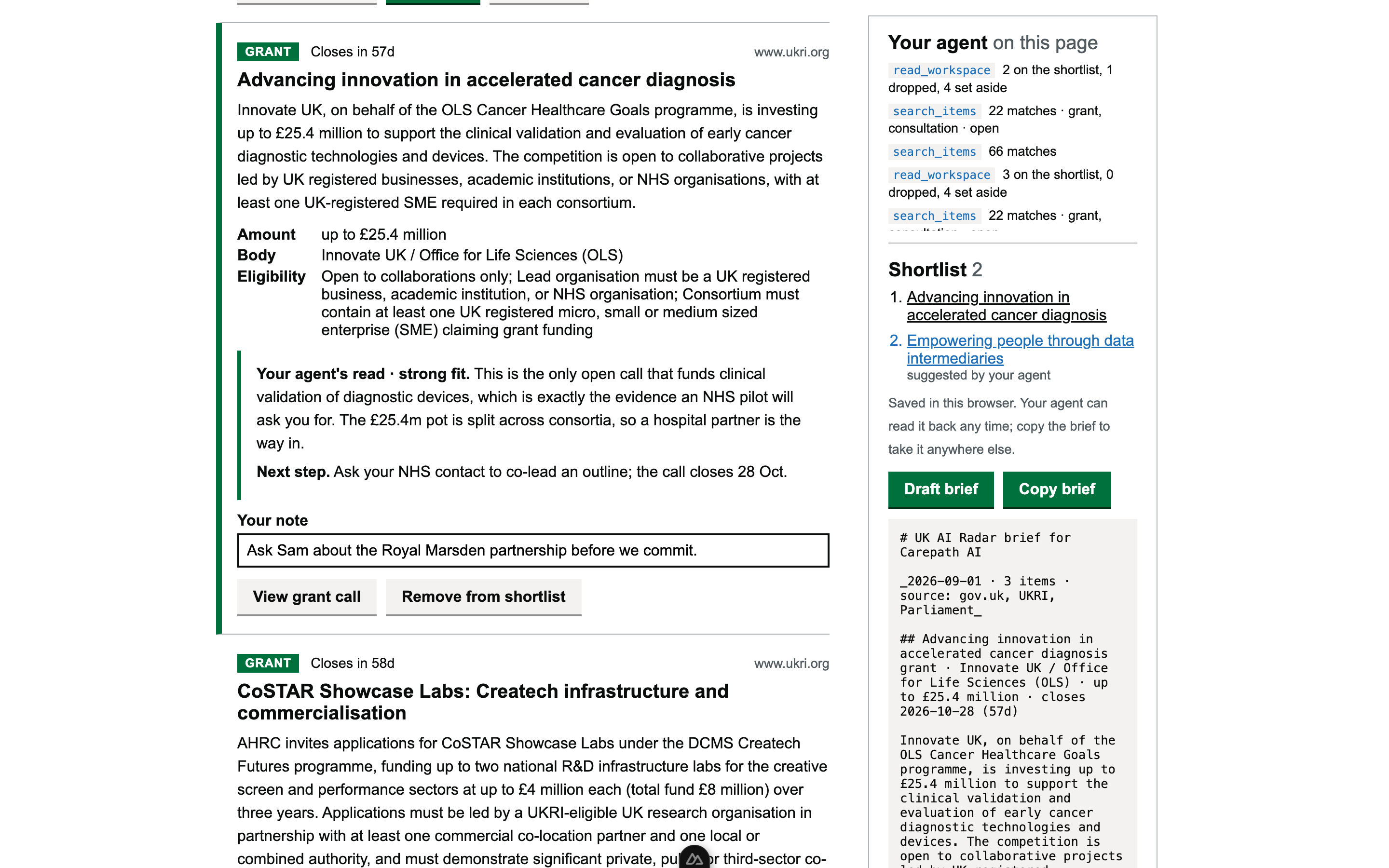
The site kept its data. My agent kept my context. I kept the last word. Nobody signed up for anything.
The agent is the session
That's the claim. The returning-user problem, the one everyone solves with accounts and cookies and drip emails, is a problem of where context lives. If the agent holds it, the page doesn't have to. Next week I say "check the radar again" and my agent proposes my profile from memory, reads what's new, and suggests. The site never learned my name.
This isn't a reason to delete every login. It's a reason to stop building one before anybody asked. If your users arrive with an agent, design the page to hand over its controls and keep the human's veto on screen. Build the account when someone without an agent asks for one.
How the page hands over its controls
Seven imperative tools registered with document.modelContext.registerTool on the top-level page, plain JSON Schema: search_items, read_item, propose_founder_profile, suggest_item, set_aside_items, read_workspace, and draft_brief. The last one is registered only while a shortlist exists and unregistered through an AbortController, so the browser fires toolchange and the agent sees the tool appear when it becomes meaningful.
Every tool calls the same functions the page's buttons call, so page and agent can never disagree about state. Model input is validated and capped before it touches anything. Results are objects, not prose. State lives in attributes the markup already has (data-status, data-mark, data-fit) and plain CSS does the rest. The human-in-the-loop moments are literal: the profile stays "proposed" until the founder keeps it, and every suggestion stays "suggested" until a click makes it kept or dropped, with the reason readable by the agent.
Chrome 149+ runs it behind chrome://flags/#enable-webmcp-testing; ChatGPT's desktop browser runs the imperative API natively. Source, MIT: github.com/hyperdrift-io/uk-ai-radar. The two-minute demo is a real agent, not a script: youtu.be/z4B0gtwbjB4.
What to take from this
If you run a product with a personalisation layer, ask which half of it exists only because the site had to hold context. That half is now optional. Hand the controls to the agent, keep the veto with the human, and see who still asks for an account.
Try it with your own agent: radar.hyperdrift.io/explore. Three prompts wait at the top of the page. And if you're working out where context should live in your product, talk to us.